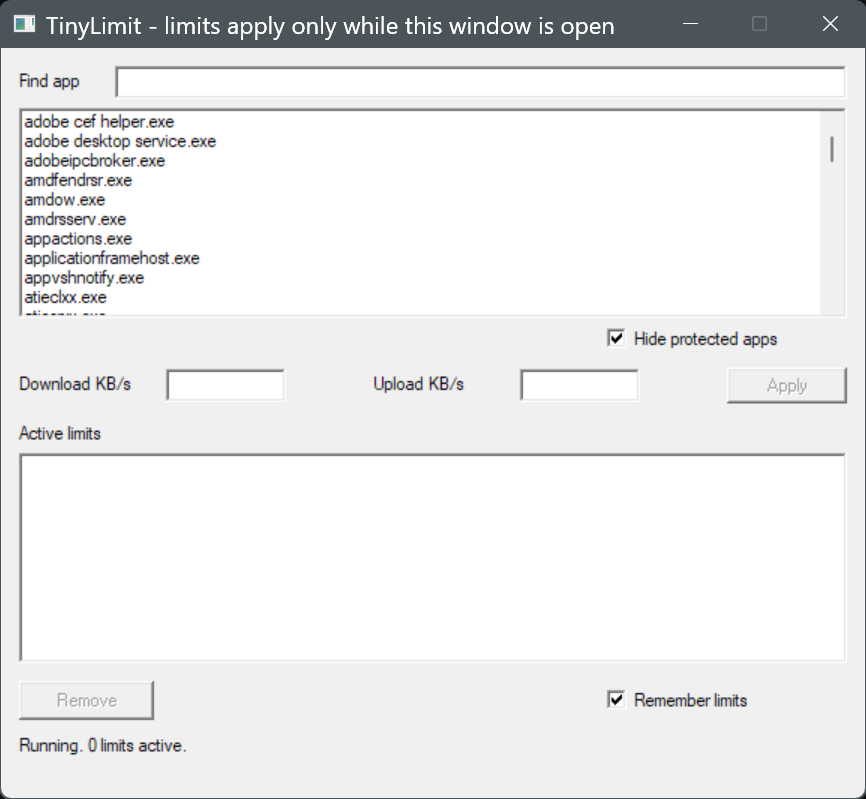
What it does
Per-app limits
Pick an app by its .exe name. All its processes share one cap, so a many-process browser gets one limit in total.
Download and upload
Two separate speeds in KB/s. Leave one empty for unlimited.
TCP and UDP
IPv4 and IPv6. Traffic to the same PC (loopback) is never touched.
Applies within a second
New, changed and removed limits take effect fast, including on connections that are already open.
Remembers limits
Saved to a plain text file beside the .exe, and enforced at start-up. One checkbox turns it off.
Safe to close
Limits last only while the window is open. Close it, or crash it, and traffic flows normally.
How to use it
Unzip
Keep the three files together in one folder.
Run as administrator
Start
tinylimit.exe. Windows asks for permission.Pick, type, Apply
Choose an app, enter KB/s, press Apply.
Why you can trust it
A tool like this sits in the path of your network traffic, so each claim below can be checked in a minute.
- One source file:
src/main.rs. - Zero third-party packages:
Cargo.locklists only TinyLimit itself. - It makes no network connections and opens no sockets.
- It writes one text file,
limits.txt, beside the .exe. - Releases are built in public by GitHub Actions.
Verify your download
Compare the ZIP's SHA-256 with SHA256SUMS.txt from the same release, then check the build attestation:
(Get-FileHash TinyLimit-x64.zip -Algorithm SHA256).Hash
gh attestation verify TinyLimit-x64.zip --repo Ehab-0/tinylimit
How it works
A flow listener learns which app owns each new connection. While at least one limit exists, the packet loop receives every non-loopback TCP and UDP packet through the WinDivert driver, and passes it on at once, delays it, or drops it. Delayed packets wait in a queue until a release thread sends them on time. Download limiting is indirect: delayed packets make the sender slow down.
How it is built
TinyLimit runs as administrator and sits in the path of your network traffic, so the design goal is that anyone can check it for themselves. Features and peak speed come second to that.
Specification first
SPEC.md was written before the code. It numbers every rule, sets hard limits, and lists what is out of scope: no service, tray icon, history, quotas or update checks.
Small, and enforced
One file, standard library only. The build fails if Cargo.lock lists a second package or the file passes its line cap. The spec asked for 900 lines; the program needed 1,470, so the cap is 1,500.
Plain, not golfed
One statement per line, descriptive names, a banner comment for each part. Lines are a proxy for reading time, so nothing was compressed to hit a number.
Easy to read in order
Logic with no Windows types, like the speed budgets and the limits.txt parser, has unit tests that run on any system. Every call into Windows or the driver sits in a commented unsafe block (37 of them).
Fails safe
After a crash, a kill or a close, Windows closes the driver handles and traffic flows normally. With no limits set, no packets are diverted. No service, no registry.
Looked up, and pinned
Windows structures were checked against Microsoft's docs and SDK headers, WinDivert against its official header. The Rust version, the WinDivert hash and every GitHub Action are fixed in the repository.
No third party has audited the code, and the one-hour reading time has not been measured.
Questions
Why does it need administrator rights?
It uses the WinDivert driver to hold back network packets, and Windows lets only an administrator open that driver.
Do limits keep working after I close the window?
No. Limits apply only while the window is open. Closing it stops all limiting. If you leave "Remember limits" ticked, they come back the next time you start the tool.
Is the download cap exact?
Download limiting is indirect: packets are delayed after they reach your PC, and the remote server then slows down. Expect the speed to settle within a few seconds.
Why might my antivirus flag it?
WinDivert is a signed, open-source kernel driver that diverts packets. Packet-diverting drivers look like malware to some scanners. It stays loaded until you reboot, or until you run sc stop WinDivert in an administrator prompt.
Why does Windows show a SmartScreen warning?
The .exe is not code-signed, because a certificate is a yearly paid cost. Use the checksum and attestation above to confirm it is the file GitHub built.
What to know first
- WinDivert is third-party kernel code. Antivirus may flag it, and it stays loaded until reboot (or
sc stop WinDivert). - The author has run TinyLimit by hand on one Windows 11 PC. It has not been tested on other PCs, on Windows 10, or with VPN software.
Known limitations:
- While any limit is active, all TCP and UDP packets pass through the tool; unlimited apps' packets are passed straight on.
- Connections are matched to apps by local port, protocol and IP version. Two apps using the same port number on different local addresses can be confused.
- The first few packets of a brand-new connection may pass before its owner is known.
- Download limiting is indirect, and speed settles within a few seconds.
- Not tested with VPN software.
- 64-bit Windows only.